ELEGOO Saturn Series LCD Screen Protector 5-Pack
Official Store Deal
Expert Analysis Overview
The ELEGOO Saturn Series LCD Screen Protector 5-Pack is a crucial maintenance component designed for serious resin 3D printing enthusiasts and workshop owners operating ELEGOO Saturn 2, 3, 4, 8K, and 12K Ultra machines. This accessory addresses a fundamental vulnerability in resin-based additive manufacturing: the delicate nature of the monochrome LCD screen.
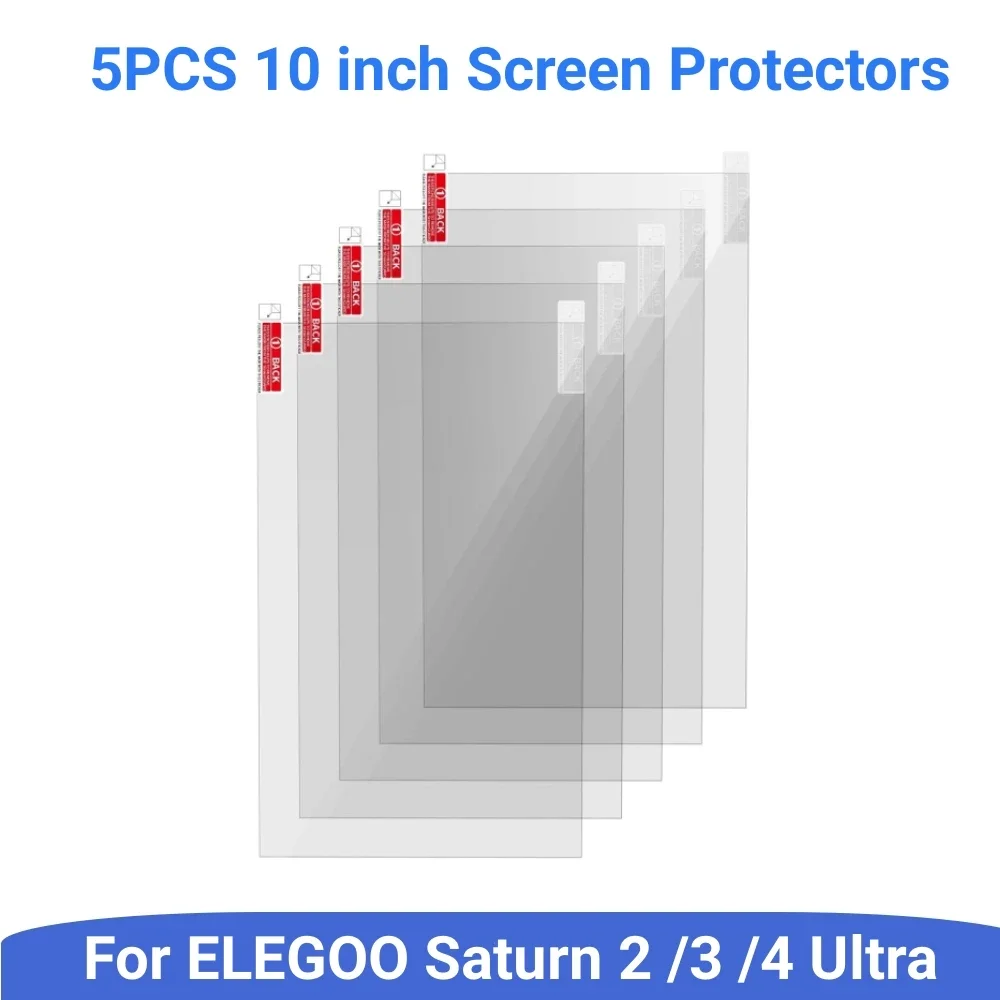
Resin 3D printers rely on a high-resolution LCD panel to selectively cure liquid resin layer by layer. This panel is directly exposed to the resin vat, making it highly susceptible to damage from spills, leaks, or even accidental scratches during cleaning. The visible product consists of five individual, clear protective films, each precisely cut to fit the 10-inch screens of the specified ELEGOO Saturn models. Each film features a small red tab, indicating a protective layer to be peeled off during installation, a standard practice for screen protectors.
Without an adequate protective layer, a single resin spill can quickly lead to irreversible damage to the LCD's polarizing layers or backlight unit. Resin is corrosive and challenging to remove once cured onto a surface. This protector acts as a sacrificial barrier. It is a simple, effective solution. The implication for the user is significant cost savings and reduced downtime. Replacing an LCD screen is expensive.
Compared to operating a resin printer without any screen protection, or relying on generic, ill-fitting films, these purpose-built protectors offer a tailored fit and material composition optimized for the specific demands of resin printing. Generic films often lack the optical clarity or chemical resistance required. This is a critical upgrade.
One of the most critical aspects of any screen protector for a resin 3D printer is its optical clarity and light transmittance. The images prominently highlight a key specification: “More than 95% light transmittance, will not affect the printing effect,” with one graphic even showing a specific measurement of “Transmittance = 96.9%.” This high transparency is vital.
Low light transmittance films can absorb or scatter the UV light emitted by the printer's light source, leading to several detrimental effects on print quality. These include increased exposure times, which slows down printing, and a reduction in print resolution and detail, as the UV light may not cure the resin precisely. Every photon counts. The clear visual demonstration of light passing through the protector underscores its suitability for high-resolution 8K and 12K printing, where even minor light diffusion could compromise fine details.
Many inferior screen protectors, particularly those not specifically designed for 3D printing, can introduce a slight haze or color shift. This can lead to uneven curing or necessitate extensive recalibration of print settings, a time-consuming process for any maker. These films aim to maintain original print fidelity. They are purpose-built.
Proper installation is paramount for any screen protector to function effectively. The included visual guide outlines a clear, six-step process, starting with cleaning the curing screen with an “alcohol prep pad,” followed by a “dry wipe,” and then a “dust-absorber.” These steps are standard for ensuring a dust-free application, which is crucial for preventing bubbles and ensuring strong adhesion. A plastic scraper is also shown for smoothing out the film.
An intuitive installation process minimizes frustration and the likelihood of errors, which could otherwise lead to wasted protectors. A clean surface is essential. For the typical maker who values efficiency and a clean workspace, having a straightforward, guided application ensures the protector is installed correctly the first time. This saves time and materials. The process is streamlined.
Many generic screen protectors offer minimal guidance, leaving users to troubleshoot installation issues like persistent bubbles or trapped dust. The inclusion of a comprehensive, visual guide, along with the necessary tools, sets these protectors apart. This supports a successful application. Community forums often share tips for perfect screen protector application, and having a good starting point with clear instructions is always appreciated.
Perhaps the most compelling argument for using these screen protectors is the stark financial comparison presented in one of the images: “Replace Film – $20, 5min” versus “Replace Screen –
Safeguarding Your LCD Investment
Resin 3D printers rely on a high-resolution LCD panel to selectively cure liquid resin layer by layer. This panel is directly exposed to the resin vat, making it highly susceptible to damage from spills, leaks, or even accidental scratches during cleaning. The visible product consists of five individual, clear protective films, each precisely cut to fit the 10-inch screens of the specified ELEGOO Saturn models. Each film features a small red tab, indicating a protective layer to be peeled off during installation, a standard practice for screen protectors.
Without an adequate protective layer, a single resin spill can quickly lead to irreversible damage to the LCD's polarizing layers or backlight unit. Resin is corrosive and challenging to remove once cured onto a surface. This protector acts as a sacrificial barrier. It is a simple, effective solution. The implication for the user is significant cost savings and reduced downtime. Replacing an LCD screen is expensive.
Compared to operating a resin printer without any screen protection, or relying on generic, ill-fitting films, these purpose-built protectors offer a tailored fit and material composition optimized for the specific demands of resin printing. Generic films often lack the optical clarity or chemical resistance required. This is a critical upgrade.
Maintaining Optical Purity for Precision Prints
One of the most critical aspects of any screen protector for a resin 3D printer is its optical clarity and light transmittance. The images prominently highlight a key specification: “More than 95% light transmittance, will not affect the printing effect,” with one graphic even showing a specific measurement of “Transmittance = 96.9%.” This high transparency is vital.
Low light transmittance films can absorb or scatter the UV light emitted by the printer's light source, leading to several detrimental effects on print quality. These include increased exposure times, which slows down printing, and a reduction in print resolution and detail, as the UV light may not cure the resin precisely. Every photon counts. The clear visual demonstration of light passing through the protector underscores its suitability for high-resolution 8K and 12K printing, where even minor light diffusion could compromise fine details.
Many inferior screen protectors, particularly those not specifically designed for 3D printing, can introduce a slight haze or color shift. This can lead to uneven curing or necessitate extensive recalibration of print settings, a time-consuming process for any maker. These films aim to maintain original print fidelity. They are purpose-built.
The Installation Process: A Maker's Guide
Proper installation is paramount for any screen protector to function effectively. The included visual guide outlines a clear, six-step process, starting with cleaning the curing screen with an “alcohol prep pad,” followed by a “dry wipe,” and then a “dust-absorber.” These steps are standard for ensuring a dust-free application, which is crucial for preventing bubbles and ensuring strong adhesion. A plastic scraper is also shown for smoothing out the film.
An intuitive installation process minimizes frustration and the likelihood of errors, which could otherwise lead to wasted protectors. A clean surface is essential. For the typical maker who values efficiency and a clean workspace, having a straightforward, guided application ensures the protector is installed correctly the first time. This saves time and materials. The process is streamlined.
Many generic screen protectors offer minimal guidance, leaving users to troubleshoot installation issues like persistent bubbles or trapped dust. The inclusion of a comprehensive, visual guide, along with the necessary tools, sets these protectors apart. This supports a successful application. Community forums often share tips for perfect screen protector application, and having a good starting point with clear instructions is always appreciated.
The Economic Argument: Prevention Over Repair
Perhaps the most compelling argument for using these screen protectors is the stark financial comparison presented in one of the images: “Replace Film – $20, 5min” versus “Replace Screen –
50, 5hr.” This highlights the significant cost disparity between a preventative measure and a reactive repair. The price difference is substantial.
This comparison powerfully illustrates the return on investment for a maker. A small upfront cost for a multi-pack of protectors can prevent a much larger expense and considerable downtime. Five minutes of installation time is a small price to pay for avoiding five hours of complex screen replacement, not to mention the cost of a new LCD panel. This is proactive maintenance. The economic benefit is clear.
Many makers, especially those new to resin printing, might underestimate the fragility and cost of the LCD screen. The images effectively communicate the financial risk involved, subtly encouraging the adoption of these protectors as an indispensable part of a resin printer setup. This framing helps justify the purchase. It's an essential safeguard.
For the maker and tinkerer, the ability to modify and improve their machine over time is a core aspect of the hobby. These screen protectors facilitate experimentation by providing a safety net. With a protected screen, users can feel more confident trying new resins, pushing the boundaries of their printer's capabilities, or even designing custom resin vats, knowing that their primary display is guarded. This encourages innovation. It fosters creativity.
The availability of readily replaceable consumables like these screen protectors ensures that a minor mishap doesn't halt an entire project or workshop operation. A resin printer is a tool, and like any tool, it requires maintenance and protection. Easy access to replacement parts, especially a multi-pack, means less waiting for shipments and more time printing. This maintains workflow momentum.
The resin 3D printing community thrives on shared knowledge and troubleshooting. When issues arise, having a clear screen protector means one less variable to consider when diagnosing print failures. It removes a common point of failure. Members often share their experiences with screen damage and the importance of protection, reinforcing the value of such accessories. These protectors are a community-backed best practice.
While the specific material composition isn't explicitly detailed, the
This comparison powerfully illustrates the return on investment for a maker. A small upfront cost for a multi-pack of protectors can prevent a much larger expense and considerable downtime. Five minutes of installation time is a small price to pay for avoiding five hours of complex screen replacement, not to mention the cost of a new LCD panel. This is proactive maintenance. The economic benefit is clear.
Many makers, especially those new to resin printing, might underestimate the fragility and cost of the LCD screen. The images effectively communicate the financial risk involved, subtly encouraging the adoption of these protectors as an indispensable part of a resin printer setup. This framing helps justify the purchase. It's an essential safeguard.
Enhancing the Maker's Workflow and Experimentation
For the maker and tinkerer, the ability to modify and improve their machine over time is a core aspect of the hobby. These screen protectors facilitate experimentation by providing a safety net. With a protected screen, users can feel more confident trying new resins, pushing the boundaries of their printer's capabilities, or even designing custom resin vats, knowing that their primary display is guarded. This encourages innovation. It fosters creativity.
The availability of readily replaceable consumables like these screen protectors ensures that a minor mishap doesn't halt an entire project or workshop operation. A resin printer is a tool, and like any tool, it requires maintenance and protection. Easy access to replacement parts, especially a multi-pack, means less waiting for shipments and more time printing. This maintains workflow momentum.
The resin 3D printing community thrives on shared knowledge and troubleshooting. When issues arise, having a clear screen protector means one less variable to consider when diagnosing print failures. It removes a common point of failure. Members often share their experiences with screen damage and the importance of protection, reinforcing the value of such accessories. These protectors are a community-backed best practice.
Durability in the Workshop Environment
While the specific material composition isn't explicitly detailed, the