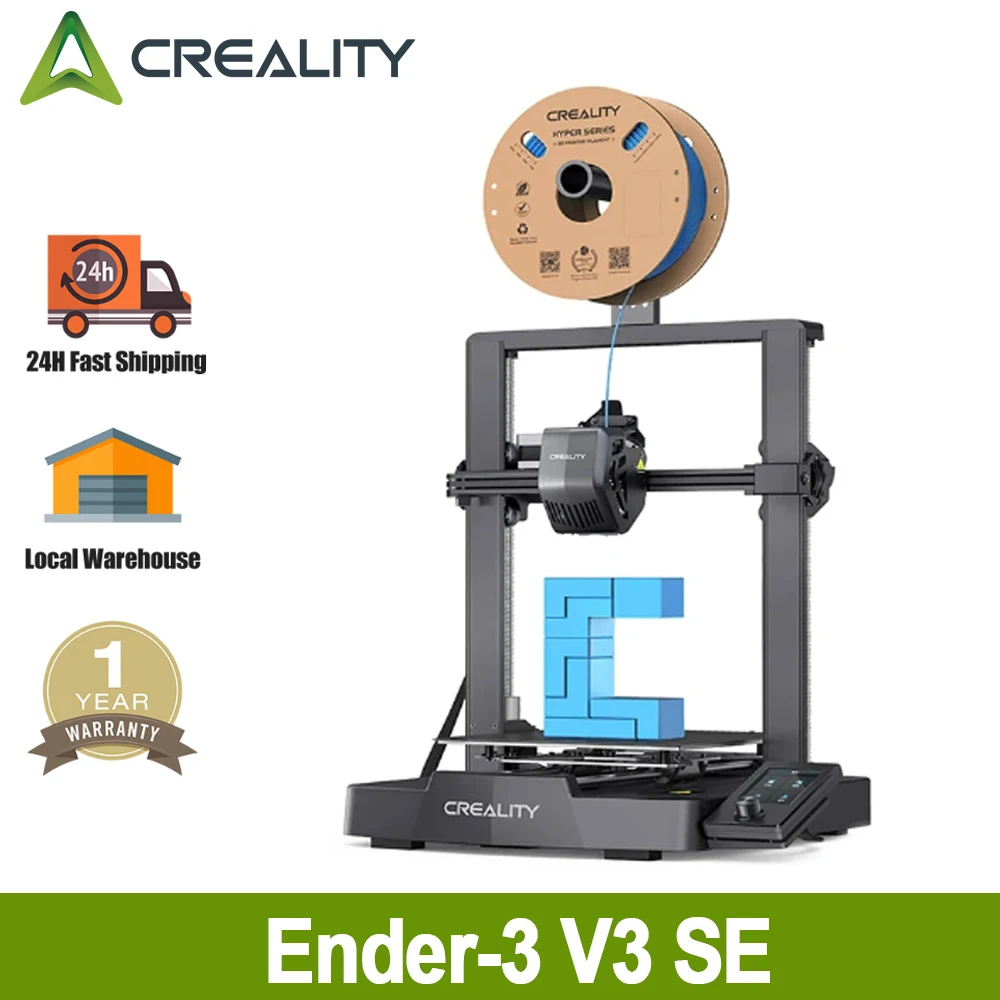
Creality Ender-3 V3 SE 3D Printer
Official Store Deal
Expert Analysis Overview
The Creality Ender-3 V3 SE 3D Printer is a highly accessible and efficient additive manufacturing tool, specifically engineered to lower the barrier to entry for students and educators in STEM fields. This machine combines user-friendly features with robust mechanical components, making it an ideal choice for learning environments and hobbyists seeking consistent results without extensive manual calibration.
The Ender-3 V3 SE incorporates a rigid dual Z-axis system. This design choice provides synchronized vertical movement for the print head, ensuring that the gantry remains level throughout the printing process. A stable gantry is critical.
In practical terms, this dual Z-axis configuration significantly reduces Z-wobble, a common issue in 3D printing that can lead to inconsistent layer lines and diminished print quality, especially on taller models. The print head maintains its precise height relative to the build plate, layer after layer, which is essential for accurate dimensional outputs.
Compared to single Z-axis systems prevalent in many entry-level printers, the dual Z-axis offers superior stability and repeatability. This upgrade minimizes the need for constant adjustments and allows for more reliable printing of complex geometries, directly translating to fewer failed prints and greater confidence in the machine's output.
Furthermore, the Y-axis utilizes a pair of 8mm thick linear shafts crafted from wear-proof steel. These shafts are substantially thicker than the thin rods found on many budget printers. This choice of material and dimension ensures the build platform moves steadily and without deflection.
The implication for users is a build platform that remains exceptionally stable, even during rapid movements or when supporting heavier prints. The robust construction of the Y-axis directly contributes to the overall print quality by preventing unwanted vibrations or shifts in the print bed's position, which can otherwise introduce artifacts into the printed object. It moves smoothly.
This enhanced Y-axis stability stands in contrast to systems employing thinner rods or less rigid components, which can flex or bind over time, leading to inconsistent print bed movement and print defects. The use of wear-proof steel also suggests a longer operational lifespan for these critical motion components, reducing maintenance needs and improving long-term reliability.
The user interface (UI) of the Ender-3 V3 SE adopts motion graphics to display the leveling process and other operational parameters. This visual feedback system transforms what can often be an abstract or confusing sequence into a clear, animated guide.
For new users or those in a classroom setting, this animated UI simplifies the learning curve significantly. Users can quickly grasp the status of the printer, understand the steps involved in tasks like leveling, and monitor progress at a glance. The visual cues make complex operations more approachable.
Unlike older, text-based LCD screens that require users to interpret numerical data or navigate cryptic menus, the graphical interface provides immediate, intuitive understanding. This design choice reduces frustration and empowers users to operate the printer effectively with minimal prior experience, fostering a more positive learning environment.
The printer boasts the ability to get printing started within 20 minutes of unboxing. This rapid deployment is achieved through a combination of pre-assembly, worry-free auto-leveling, and auto filament loading/unloading features.
For educational institutions or users eager to begin printing without extensive setup, this quick start time is a significant advantage. The minimal assembly required means less time spent with tools and instructions, and more time engaged in the actual creative process of 3D printing. It is ready quickly.
Many entry-level 3D printers demand considerable time for assembly and manual calibration, which can be a deterrent for beginners. The Ender-3 V3 SE's focus on rapid deployment addresses this pain point directly, allowing users to move from setup to printing with unprecedented speed and ease.
Central to its ease of use is the worry-free auto-leveling system. This feature automatically probes the build surface and adjusts for any inconsistencies, eliminating the tedious and often frustrating manual bed leveling process.
Automatic leveling ensures optimal first layer adhesion, which is crucial for successful prints. It removes a major source of error and frustration for beginners, allowing them to focus on design and material choices rather than mechanical adjustments. The printer handles the calibration.
Traditional 3D printers often require users to manually adjust screws or sensors to achieve a perfectly level bed, a skill that takes practice and can significantly impact print quality if done incorrectly. The Ender-3 V3 SE's auto-leveling system provides a consistent and reliable foundation for every print, regardless of user experience.
The auto filament loading and unloading mechanism further streamlines the printing workflow. Users simply tap 'Extrude' or 'Retract' on the UI, and the filament is automatically fed into or removed from the nozzle. This eliminates manual pushing or pulling.
This automated filament management simplifies material changes, making it effortless to switch between different colors or types of filament. It also reduces the risk of incorrect loading, which can lead to clogs or failed prints, ensuring a smoother and more efficient operation.
Compared to printers that require manual manipulation of filament, often involving awkward angles and force, the automated system is a considerable convenience. It protects the extruder gears from wear and tear associated with improper loading, contributing to the printer's longevity and ease of maintenance.
The Ender-3 V3 SE is capable of a maximum printing speed of 250mm/s with an acceleration of 2500mm/s². This speed is a significant leap for an entry-level machine.
High print speeds translate directly into reduced print times, allowing users to iterate on designs more quickly or produce multiple prints in a shorter timeframe. For educational settings, this means more students can complete projects within a class period, maximizing the utility of the printer. Prints finish faster.
Many budget 3D printers operate at speeds closer to 50-100mm/s, making print jobs lengthy and potentially limiting productivity. The Ender-3 V3 SE's accelerated capabilities position it as a much more efficient tool, saving considerable time on typical print tasks, as demonstrated by the 73% time saved example for a benchmark print.
Equipped with a Sprite Direct Drive Extruder, the printer positions the extruder motor directly above the hotend. This shortens the filament path significantly.
This direct drive configuration offers superior control over filament feeding and retraction, which is particularly beneficial when working with flexible filaments like TPU. The reduced distance between the drive gears and the nozzle minimizes opportunities for filament buckling or tangling, leading to more reliable extrusion. It feeds precisely.
Unlike Bowden extrusion systems, where the extruder motor is mounted remotely and pushes filament through a long PTFE tube, the direct drive system provides immediate and powerful filament delivery. This leads to better retraction performance, reducing stringing and oozing, and expanding the range of materials the printer can effectively handle.
The build plate is made of PC Spring Steel. This material offers excellent adhesion for a wide range of filaments when heated, yet allows for easy removal of prints once cooled by simply flexing the plate.
This type of build plate provides a durable and convenient printing surface. The PC (polycarbonate) coating enhances adhesion, while the spring steel core allows for effortless print detachment without the need for scrapers or excessive force, preserving both the print and the bed. Print removal is simple.
Compared to traditional glass beds or fixed build surfaces that might require adhesive sprays or careful prying, the PC spring steel plate simplifies post-printing workflow. Its flexibility and durability make it a user-friendly and long-lasting component, ideal for repeated use in demanding environments.
While 3D printers are generally safe, the Ender-3 V3 SE includes features that inherently contribute to a safer operating environment. The enclosed nature of the hotend and the stable chassis design reduce accidental contact points.
For educational use, the robust construction and automated features minimize opportunities for user error that could lead to minor hazards. The intuitive UI also helps guide users away from potentially unsafe operations. It operates reliably.
Many DIY printer kits or less refined models might expose more moving parts or hot components, increasing the risk of accidental burns or pinches. The design of the Ender-3 V3 SE appears to prioritize a more contained and controlled operational footprint, which is beneficial in environments with multiple users.
While not explicitly detailed in the images, Creality printers typically integrate well with popular slicing software such as Cura or PrusaSlicer. These programs translate 3D models into printable instructions (G-code) for the printer.
Effective slicing software is crucial for optimizing print quality, speed, and material usage. The compatibility with widely-used slicers ensures users have access to a broad range of settings and profiles, allowing them to fine-tune their prints for specific needs. Software is vital.
The availability of a robust software ecosystem, coupled with Creality's extensive online community and support resources, means users are not left to troubleshoot issues alone. This community aspect is invaluable for beginners and experienced users alike, offering a wealth of shared knowledge and solutions.
Imagine the satisfaction of seeing your designs materialize with precision and speed. Picture a classroom where students confidently bring their ideas to life, unhindered by complex setups or unreliable machinery. Envision a workshop where prototypes are rapidly iterated, accelerating innovation and learning. This printer empowers creators to focus on the 'what if' rather than the 'how to,' transforming digital concepts into tangible realities with remarkable ease and consistency.
Foundational Stability: The Bedrock of Precision
The Ender-3 V3 SE incorporates a rigid dual Z-axis system. This design choice provides synchronized vertical movement for the print head, ensuring that the gantry remains level throughout the printing process. A stable gantry is critical.
In practical terms, this dual Z-axis configuration significantly reduces Z-wobble, a common issue in 3D printing that can lead to inconsistent layer lines and diminished print quality, especially on taller models. The print head maintains its precise height relative to the build plate, layer after layer, which is essential for accurate dimensional outputs.
Compared to single Z-axis systems prevalent in many entry-level printers, the dual Z-axis offers superior stability and repeatability. This upgrade minimizes the need for constant adjustments and allows for more reliable printing of complex geometries, directly translating to fewer failed prints and greater confidence in the machine's output.
Furthermore, the Y-axis utilizes a pair of 8mm thick linear shafts crafted from wear-proof steel. These shafts are substantially thicker than the thin rods found on many budget printers. This choice of material and dimension ensures the build platform moves steadily and without deflection.
The implication for users is a build platform that remains exceptionally stable, even during rapid movements or when supporting heavier prints. The robust construction of the Y-axis directly contributes to the overall print quality by preventing unwanted vibrations or shifts in the print bed's position, which can otherwise introduce artifacts into the printed object. It moves smoothly.
This enhanced Y-axis stability stands in contrast to systems employing thinner rods or less rigid components, which can flex or bind over time, leading to inconsistent print bed movement and print defects. The use of wear-proof steel also suggests a longer operational lifespan for these critical motion components, reducing maintenance needs and improving long-term reliability.
Intuitive Interaction: Bringing the User Interface to Life
The user interface (UI) of the Ender-3 V3 SE adopts motion graphics to display the leveling process and other operational parameters. This visual feedback system transforms what can often be an abstract or confusing sequence into a clear, animated guide.
For new users or those in a classroom setting, this animated UI simplifies the learning curve significantly. Users can quickly grasp the status of the printer, understand the steps involved in tasks like leveling, and monitor progress at a glance. The visual cues make complex operations more approachable.
Unlike older, text-based LCD screens that require users to interpret numerical data or navigate cryptic menus, the graphical interface provides immediate, intuitive understanding. This design choice reduces frustration and empowers users to operate the printer effectively with minimal prior experience, fostering a more positive learning environment.
Rapid Deployment: From Box to First Print
The printer boasts the ability to get printing started within 20 minutes of unboxing. This rapid deployment is achieved through a combination of pre-assembly, worry-free auto-leveling, and auto filament loading/unloading features.
For educational institutions or users eager to begin printing without extensive setup, this quick start time is a significant advantage. The minimal assembly required means less time spent with tools and instructions, and more time engaged in the actual creative process of 3D printing. It is ready quickly.
Many entry-level 3D printers demand considerable time for assembly and manual calibration, which can be a deterrent for beginners. The Ender-3 V3 SE's focus on rapid deployment addresses this pain point directly, allowing users to move from setup to printing with unprecedented speed and ease.
Central to its ease of use is the worry-free auto-leveling system. This feature automatically probes the build surface and adjusts for any inconsistencies, eliminating the tedious and often frustrating manual bed leveling process.
Automatic leveling ensures optimal first layer adhesion, which is crucial for successful prints. It removes a major source of error and frustration for beginners, allowing them to focus on design and material choices rather than mechanical adjustments. The printer handles the calibration.
Traditional 3D printers often require users to manually adjust screws or sensors to achieve a perfectly level bed, a skill that takes practice and can significantly impact print quality if done incorrectly. The Ender-3 V3 SE's auto-leveling system provides a consistent and reliable foundation for every print, regardless of user experience.
The auto filament loading and unloading mechanism further streamlines the printing workflow. Users simply tap 'Extrude' or 'Retract' on the UI, and the filament is automatically fed into or removed from the nozzle. This eliminates manual pushing or pulling.
This automated filament management simplifies material changes, making it effortless to switch between different colors or types of filament. It also reduces the risk of incorrect loading, which can lead to clogs or failed prints, ensuring a smoother and more efficient operation.
Compared to printers that require manual manipulation of filament, often involving awkward angles and force, the automated system is a considerable convenience. It protects the extruder gears from wear and tear associated with improper loading, contributing to the printer's longevity and ease of maintenance.
Engineered for Speed: Accelerating the Learning Curve
The Ender-3 V3 SE is capable of a maximum printing speed of 250mm/s with an acceleration of 2500mm/s². This speed is a significant leap for an entry-level machine.
High print speeds translate directly into reduced print times, allowing users to iterate on designs more quickly or produce multiple prints in a shorter timeframe. For educational settings, this means more students can complete projects within a class period, maximizing the utility of the printer. Prints finish faster.
Many budget 3D printers operate at speeds closer to 50-100mm/s, making print jobs lengthy and potentially limiting productivity. The Ender-3 V3 SE's accelerated capabilities position it as a much more efficient tool, saving considerable time on typical print tasks, as demonstrated by the 73% time saved example for a benchmark print.
Extrusion Excellence: The Sprite Direct Drive Advantage
Equipped with a Sprite Direct Drive Extruder, the printer positions the extruder motor directly above the hotend. This shortens the filament path significantly.
This direct drive configuration offers superior control over filament feeding and retraction, which is particularly beneficial when working with flexible filaments like TPU. The reduced distance between the drive gears and the nozzle minimizes opportunities for filament buckling or tangling, leading to more reliable extrusion. It feeds precisely.
Unlike Bowden extrusion systems, where the extruder motor is mounted remotely and pushes filament through a long PTFE tube, the direct drive system provides immediate and powerful filament delivery. This leads to better retraction performance, reducing stringing and oozing, and expanding the range of materials the printer can effectively handle.
Material Versatility: Beyond Basic Plastics
The build plate is made of PC Spring Steel. This material offers excellent adhesion for a wide range of filaments when heated, yet allows for easy removal of prints once cooled by simply flexing the plate.
This type of build plate provides a durable and convenient printing surface. The PC (polycarbonate) coating enhances adhesion, while the spring steel core allows for effortless print detachment without the need for scrapers or excessive force, preserving both the print and the bed. Print removal is simple.
Compared to traditional glass beds or fixed build surfaces that might require adhesive sprays or careful prying, the PC spring steel plate simplifies post-printing workflow. Its flexibility and durability make it a user-friendly and long-lasting component, ideal for repeated use in demanding environments.
Safety in the Classroom: Mitigating Operational Risks
While 3D printers are generally safe, the Ender-3 V3 SE includes features that inherently contribute to a safer operating environment. The enclosed nature of the hotend and the stable chassis design reduce accidental contact points.
For educational use, the robust construction and automated features minimize opportunities for user error that could lead to minor hazards. The intuitive UI also helps guide users away from potentially unsafe operations. It operates reliably.
Many DIY printer kits or less refined models might expose more moving parts or hot components, increasing the risk of accidental burns or pinches. The design of the Ender-3 V3 SE appears to prioritize a more contained and controlled operational footprint, which is beneficial in environments with multiple users.
The Ecosystem of Creation: Software and Support
While not explicitly detailed in the images, Creality printers typically integrate well with popular slicing software such as Cura or PrusaSlicer. These programs translate 3D models into printable instructions (G-code) for the printer.
Effective slicing software is crucial for optimizing print quality, speed, and material usage. The compatibility with widely-used slicers ensures users have access to a broad range of settings and profiles, allowing them to fine-tune their prints for specific needs. Software is vital.
The availability of a robust software ecosystem, coupled with Creality's extensive online community and support resources, means users are not left to troubleshoot issues alone. This community aspect is invaluable for beginners and experienced users alike, offering a wealth of shared knowledge and solutions.
Imagine the satisfaction of seeing your designs materialize with precision and speed. Picture a classroom where students confidently bring their ideas to life, unhindered by complex setups or unreliable machinery. Envision a workshop where prototypes are rapidly iterated, accelerating innovation and learning. This printer empowers creators to focus on the 'what if' rather than the 'how to,' transforming digital concepts into tangible realities with remarkable ease and consistency.